
If you are a regatta organizer in charge of writing the NOR and/or Sailing Instructions for a regatta which is part of the J/24 Texas Circuit, this page contains examples of how you can include the J/24 addendums as part of your documents, as follows:
- EXAMPLE #1: Merging PDF documents
- EXAMPLE #2: Including links to addendums on your documents
- EXAMPLE #3: Including buttons on your website to download addendums
These three examples are discussed in more detail below.
EXAMPLE #1: Merging PDF documents
One simple way to include the J/24 addendums as part of your NOR and/or Sailing Instructions is to use a PDF merge tool to combine both documents into a single (merged) PDF document. The steps required to use this approach are shown below:
- Step 1: Prepare your document and save as PDF (for example save your NOR as PDF).
- Step 2: Download the corresponding J/24 addendum (for example download the J/24 NOR Addendum).
- Step 3: Use a PDF merge tool to merge both documents into a single document (for example Adobe has a free online PDF merge tool: https://www.adobe.com/acrobat/online/merge-pdf.html).
The link below from the 2023 Rush Creek Yacht Club Texas Independence Day Regatta shows an example of using this approach to merge the NOR into a single document:
Similarly you could use this approach and merge your event Sailing Instructions with the J/24 SI Addendum to create a single document.
EXAMPLE #2: Including links to addendums on your documents
Another approach to including the J/24 addendums as part of your NOR and/or Sailing Instructions is to download the addendums to your website and add a section to your NOR and/or Sailing Instructions with a link to the addendums. The steps required to use this approach are shown below:
- Step 1: Download the corresponding J/24 addendum to a location you can reference (for example download the J/24 NOR Addendum to the website hosting your event documentation).
- Step 2: Add a section to your document referencing the J/24 addendum (for example add a section titled J/24 Class Addendum).
- Step 3: Add a link to the J/24 addendum to your document.
The link below from the 2017 J/Fest Southwest Regatta Hosted by Lakewood Yacht Club shows an example of using this approach. See section 18. J/24 Class only in the NOR below:
Similarly you could use this approach to add a section to your Sailing Instructions with a link to the J/24 SI Addendum.
EXAMPLE #3: Including buttons on your website to download addendums
Finally, if your website has “buttons” to allow competitors to download your Notice of Race and Sailing Instructions, then a very easy approach to including the J/24 addendums as part of your event is to download the addendums to your website and add buttons to allow competitors to download the addendums. The steps required to use this approach are shown below:
- Step 1: Download both J/24 addendums to a location you can reference (for example download both the NOR and SI addendums to the website hosting your event documentation).
- Step 2: Add a button to your website to allow competitors to download the J/24 NOR Addendum.
- Step 3: Similarly, add a button to allow competitors to download the J/24 SI Addendum.
The image below shows an example of using this approach using a popular regatta management website.
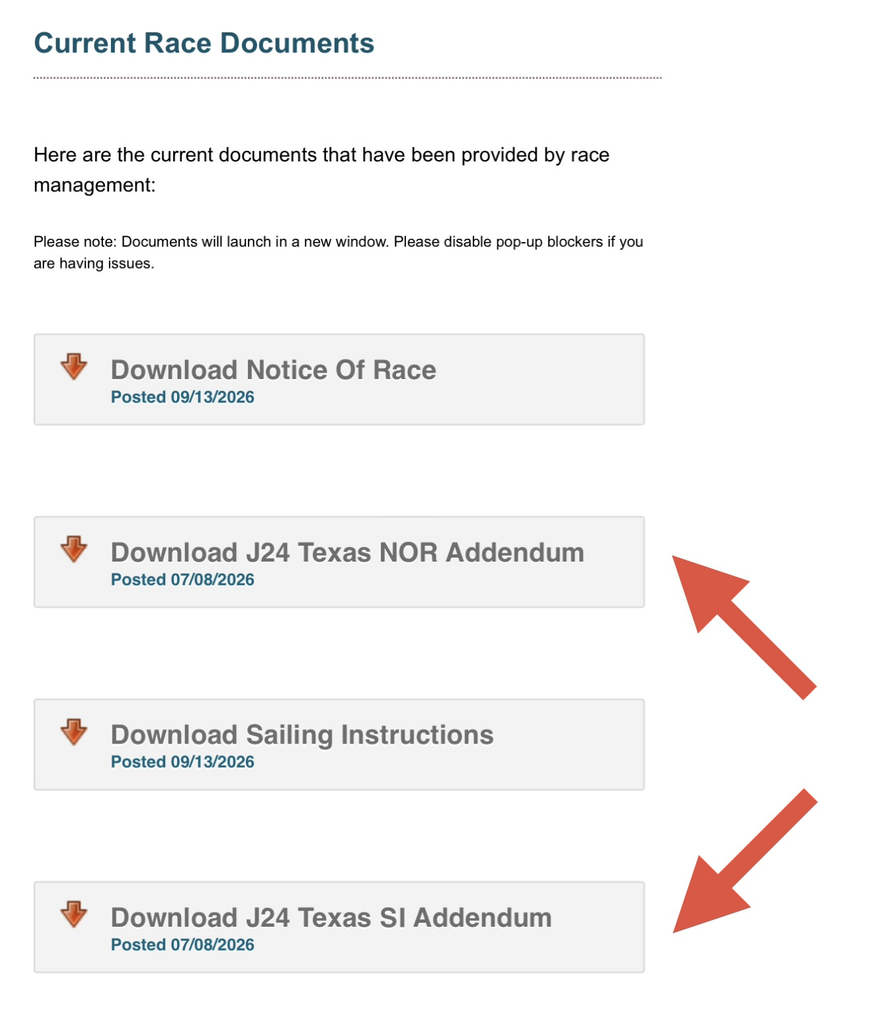
Notice in the image above that the regatta organizers have added two buttons to download the event’s regular Notice of Race as well as the event’s regular Sailing Instructions, and notice the regatta organizers have added two additional buttons to allow competitors to download the J/24 Texas NOR Addendum as well as the J/24 Texas SI Addendum, as shown by the red arrows in the image above.
The main Regatta Organizer’s page contains links to the latest NOR and SI addendums which you can link to your website. To go back to the main Regatta Organizer’s page, click here: Regatta Organizers page.